Kitchen display
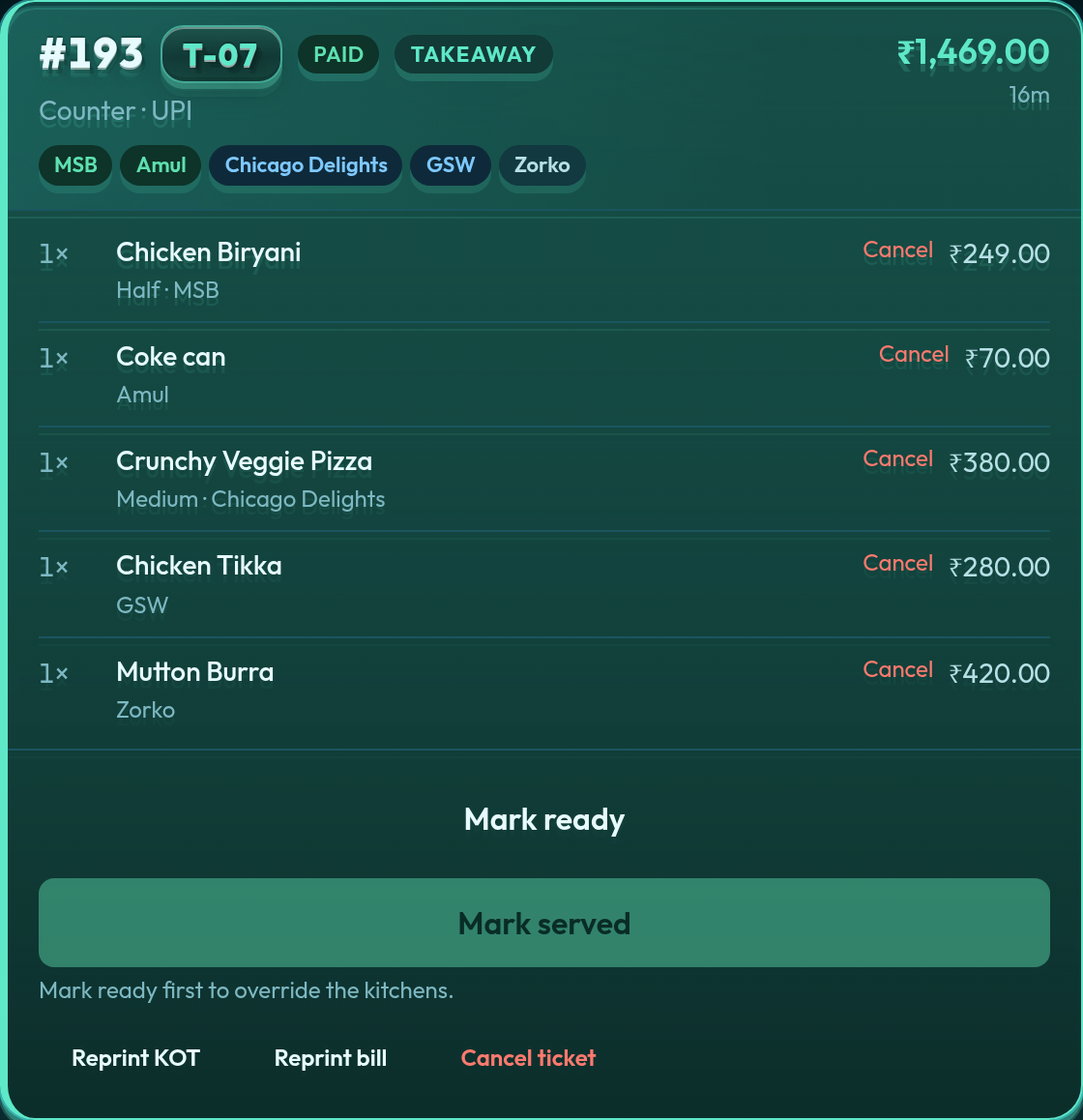
Station logins see only their items — “my portion ready”, then picked up. Managers see every ticket, reprint KOT/bill, void a line, or add to a postpaid order.
Free POS for restaurants in the cloud: kitchen tickets and GST bills in the browser, with no desktop install and no salesperson demo. Sign up and start on Basic (free) or a Premium trial.
Only POS where you pay for only what you need.
The plan runs the floor: orders, kitchen tickets, and the bill. Add Inventory Management, the Self ordering Kiosk, and a larger plan when the house needs them.
The same product. A 12-cover café on Basic, a food court on Premium. Four billing shapes.
Free POS for restaurants: single kitchen, KOT, GST / FSSAI bills. Start free on Basic.
One counter, many stalls, one GST bill, token pickup. The POS Indian malls still stitch together by hand.
Coffee shop, specialty restaurant, and bar on one guest check. Each kitchen only sees its lines.
Franchise and multi-city restaurants. Distinct tills. HQ can look in. Tickets never cross cities.
The same flows your team will use at 1pm on a Saturday — collect payment, merge or split a table, mark a station ready, export last night’s sales.
Station logins see only their items — “my portion ready”, then picked up. Managers see every ticket, reprint KOT/bill, void a line, or add to a postpaid order.
Cash tender with change, card, UPI, or a split across all three. Daily report bars follow the mode you actually chose.
Postpaid or prepaid. Table list on every plan.
Station → category → item. Variants, sub-variants, add-ons, stock alerts. Bulk Excel upload on Economy and above.
FSSAI, GSTIN, and optional distinct station totals on one invoice when kitchens bill separately.
On Premium and Enterprise: guest menu on app.quickkot.com, stock-aware, pay by QR or “pay at counter” drafts that load on the POS. Same feature on both plans — Enterprise only starts with higher kitchen and user caps. Email support@quickkot.com if an Economy restaurant needs QR.
Two bills at one table, friends joining, or a party moving to a free four-top — on the kitchen ticket, not a notepad. Split and transfer on Economy and above. Merge is Multi-Outlet, same outlet. How merge and split works.
Public pickup board after payment. A kitchen lights next to the token when that stall marks ready — guests watch one screen instead of shouting. Premium and Enterprise, centralised floors. More on food court POS.
See which counter login rang the sales — orders, UPI / card / cash, discounts, cancels — on the same date range as the daily report. Shows when the floor has more than one live counter login.
Floor-stand menu: guests browse photos, pick variants, and pay UPI or card as the payment gateway is set. Cash stays at the billing counter. Add-on for any plan except Basic. See the Self ordering Kiosk.
Suppliers, purchase bills, what is on hand, the recipe behind each dish, a real time gross profit graph, and a supplier price comparison. An add-on when the store room should live in the same system. See Inventory Management.
MSB only gets biryani. Chicago Delights only gets pizza. The floor can still sell both on one order — tickets split by station.
Completed bills stay searchable for 48 hours if you need to change payment mode or cancel. Paid plans export a station-wise sales workbook.
Testimonial
Q: What was managing Shimla QoH Food Court like before QuickKOT?
A: We run eleven stalls, so things can get pretty busy, especially during rush hours. Before QuickKOT, it felt a bit all over the place because guests had to pay at different desks, and the queues would slow everything down.
Q: What changed after using QuickKOT?
A: The whole process became much simpler. Guests can order biryani from one kitchen and pizza from another, but it still comes together as one bill. That made ordering easier for customers and handling orders easier for us.
Q: How has the Token Display helped?
A: It has made pickup a lot smoother. People just take a number, watch the screen, and collect their food when it is ready — no more shouting names across the hall.
Q: What about the QR menu?
A: The QR menu has helped too. Guests can scan, build their order, and come to the counter when they are ready, which takes a lot of pressure off the stalls.
Q: Overall, how would you describe the impact?
A: QuickKOT has made the entire food court feel calmer, smoother, and easier to manage. The rush is still there, but now it is much more organized.
Google or email signup on app.quickkot.com. A 12-cover café starts on Basic. Upgrade when the floor needs KDS, reports, or a second kitchen.
Create your POS