Merge and split restaurant tables is the Saturday problem every dining room already has: one four-top that wants two GST bills, friends who sit down at the next table and then ask to pay together, a party that outgrows T4 and has to move to T12. If the POS cannot do that on the running ticket, the floor rewrites the order on a notepad — and the cook works from the wrong card.
QuickKOT’s answer is table management on the same kitchen ticket the cook already sees. No second floor-map app. Tick the lines, pick a free table, or merge two open tickets at the same outlet. The KOT stays the source of truth; each ticket still closes as one legal bill.
Why merge and split tables matter on the floor
Indian dine-in is not a supermarket checkout. Guests arrive in pieces. They add a round of drinks after the mains. Two colleagues want to pay UPI while the couple on the same table pays cash. A family of six is seated at a two-top until a larger table clears. None of that is “a new order from scratch.” It is the same service, with the bill and the table map changing under the cook’s ticket.
When merge / split / transfer are missing, typical damage:
- The cashier voids and re-keys. The kitchen gets a second KOT for food that is already on the tawa.
- Two handwritten totals at one table — GST and discount never match what was cooked.
- A party moves seats and the ticket still says T4, so the runner takes the biryani to an empty table.
- Friends join from another table and someone has to “remember” which lines belong together at close.
Table ops exist so the ticket follows the guests, not the other way around.
Three jobs — with examples
Split: one table, two bills
A four-top at lunch. Two office colleagues ordered thalis; the couple next to them ordered a pizza and mocktails. They sat together because the room was full. At close they want two bills, not a polite argument over UPI.
On QuickKOT the cashier opens the running ticket, ticks Move to new ticket on the pizza and mocktails, picks a free table for the new ticket (not the original), and taps Split selected. Two open tickets. Two GST invoices. The kitchen already cooked from the first card — you did not reprint the whole order as a void.
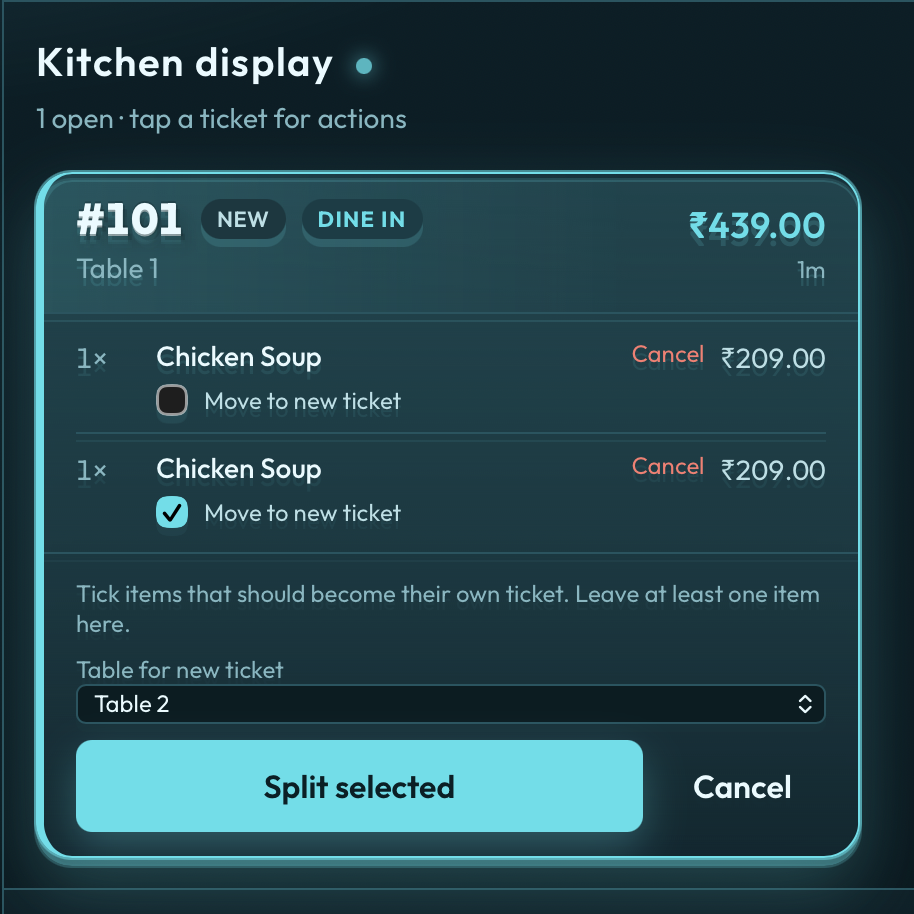
Same motion when one guest only wants to pay for drinks, or when a diner peels off to a spare two-top. You must leave at least one line on the original ticket, and dine-in needs a free table for the new one. If the floor is full, clear or transfer another table first.
Merge: two tickets, one party
Two friends sat at T6 while they waited. Their other four arrived and sat at T8. Both tables already have open tickets — filter coffee on one, starters on the other. They want one bill at the end.
Merge on QuickKOT is that job: pick From # and Into # on the merge bar, tap Merge. Lines move onto the surviving ticket. The from-ticket is cancelled with reason Merged into #N — it is not a void of food that was cooked. On Multi-Outlet, tickets from different outlets cannot be merged (a Pune store must never swallow a Jaipur ticket).
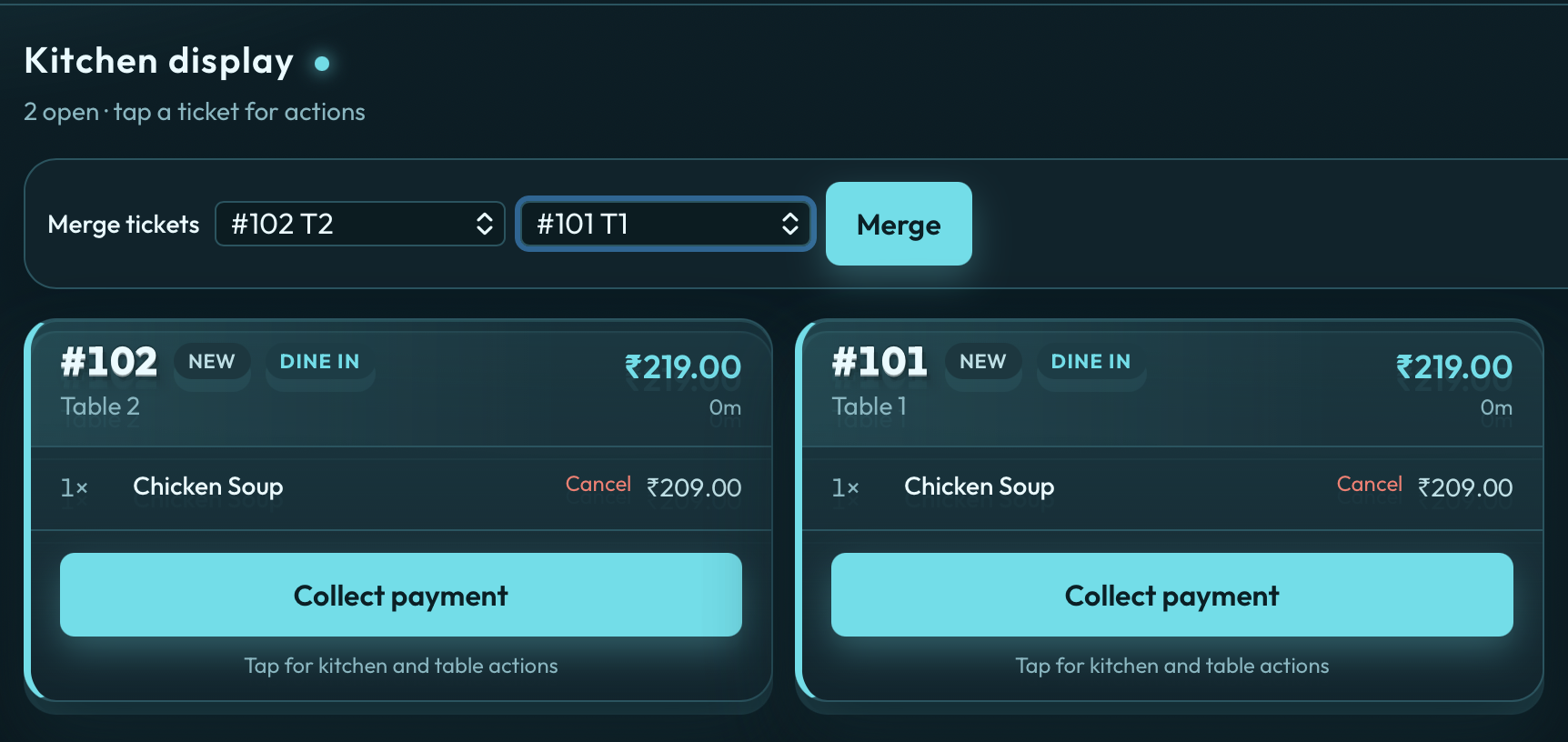
The merge bar shows wherever table management is on, on Economy and above, including Centralised billing, once more than one postpaid ticket is open. The lists show those postpaid tickets only. A prepaid ticket stays off the bar. Token only hides it. On Multi-Outlet, both tickets must be the same outlet.
Transfer: same ticket, new table
A two-top grows into a six. T12 is free. The cashier changes the table on the open dine-in ticket from T4 to T12. Destination cannot already have a running ticket. The cook’s card, the token if you use one, and the GST bill stay the same order number — only the table label moves. That is the “party moved, do not re-punch the biryani” path.
How QuickKOT keeps it easy
Most “table management software” is a pretty map that is not the ticket. QuickKOT does the opposite: the ticket is the table.
- Split lives on the card — tick lines, pick a free table, Split selected. Economy and above, centralised or Multi-Outlet.
- Transfer is the table dropdown on an open dine-in ticket. Same plans. Destination must be empty.
- Merge is a short bar above the ticket grid when table management is on and more than one postpaid ticket is open: From # / Into # / Merge. Prepaid tickets are not listed. On Multi-Outlet, both tickets must be the same outlet.
- Each ticket still closes as one GST bill (cash, card, UPI, or a payment split). Table split and payment split are different buttons on purpose.
- The Aqua kitchen display does not change personality. Variants, notes, and quantity stay on the line the cook already started.
What this is not
Split payment (cash + card + UPI on one invoice) is not a table split. One bill, three methods. Daily report bars follow the amounts you actually took.
Split KOTs in a food court (biryani to MSB, pizza to Chicago Delights, one guest bill) is centralised billing — not merge/split tables. Do not buy merge because you run a court; you already have one check. See food court POS and how the court tickets split.
Basic still has a table list (10) so a café can seat people. Merge, split, and transfer stay locked until Economy. That is the limited-order floor: a small café on Basic does not need two bills at one table on day one.
Plans, without the brochure fog
Basic (free POS for restaurants): 10 tables, ops locked. Economy (₹499 / month): 25 tables, split, transfer, and merge on. Premium / Enterprise: 99 tables, and the same split, transfer, and merge when table management is on. Economy start is via support@quickkot.com — not a self-serve checkout.
Walk through the buttons: Tables, POS seating, split and merge.
See also: restaurant POS, chains / Multi-Outlet, plans, and free POS for restaurants.
Questions from the floor
What does it mean to merge or split restaurant tables on a POS?
Split moves some items from an open ticket onto a new ticket — usually a second GST bill at a free table. Merge combines two open tickets at the same outlet into one bill. Transfer keeps the same ticket and only changes the table number. Destination tables must be free.
Does QuickKOT include merge and split tables?
Yes. Split, transfer, and merge are on Economy and above when table management is on, on centralised and Multi-Outlet floors. Basic lists tables but does not unlock those ops. On Multi-Outlet, the two tickets must be the same outlet.
Is splitting a table the same as a split payment?
No. Split payment is one bill paid with cash plus card plus UPI. Split table is two tickets — two GST invoices — when guests at a table want separate bills, or when some lines move to another free table.
Self-serve signup is opening soon. Leave your details at app.quickkot.com/signup, see plans, or write to support@quickkot.com.