The oil can come from three traders. One is lower on a quiet Tuesday. One is the name the kitchen has called for years. One sends a message at noon with a rate above last week and below the month before. When the drum is empty, the price you remember is whichever chat is still on the phone.
Flour, cheese, boxes, and vegetables move the same way. Ingredient price tracking is a stack of bills and a habit. The raw material price fluctuation is real. The comparison usually happens after the money has left.
Where the rate gets lost
The price lives in a chat
A supplier quotes on a call. Another sends a photo of a slip. A third is written in the corner of last month’s bill. The person who orders is off, and the next drum is ordered from memory.
The same ingredient, several prices
Two traders sell the same oil in the same unit. Both have supplied this kitchen. On paper they are one shelf. In the file they are two rates, and only one of them was checked before the order went out.
The jump shows up after the drum is paid for
A regular supplier moves the rate a little, then a little more. The kitchen notices when the month’s oil spend is already high. By then the cheaper weeks are gone, and the familiar name is still on the order.
Habit picks the trader
The cook knows who delivers before lunch. That is a good reason to keep a supplier. It is a weak reason to ignore three weeks where another trader was lower for the same material.
How QuickKOT keeps the prices you already paid
Inventory Management is the add-on for that store room. Orders, kitchen tickets, and the bill stay on the plan the floor already uses. Suppliers, purchase bills, and Procurement sit beside them. Only POS where you pay for only what you need. The page is Inventory Management. Write to support@quickkot.com.
Each supplier, saved once
Save the name, the numbers, and the address. The next bill starts from that supplier, so every rate is tied to a trader the kitchen can name again.
The rate, on the day it arrived
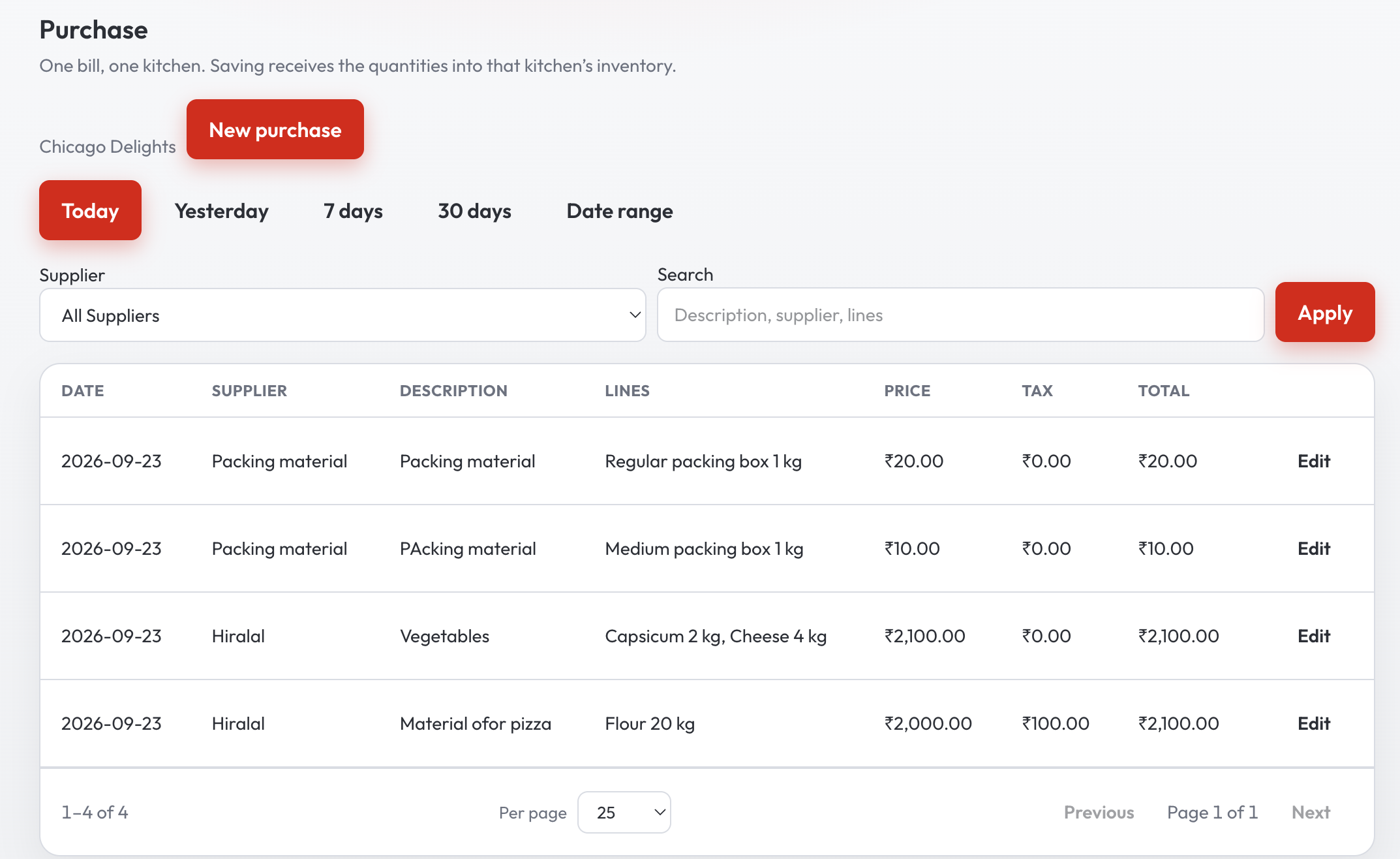
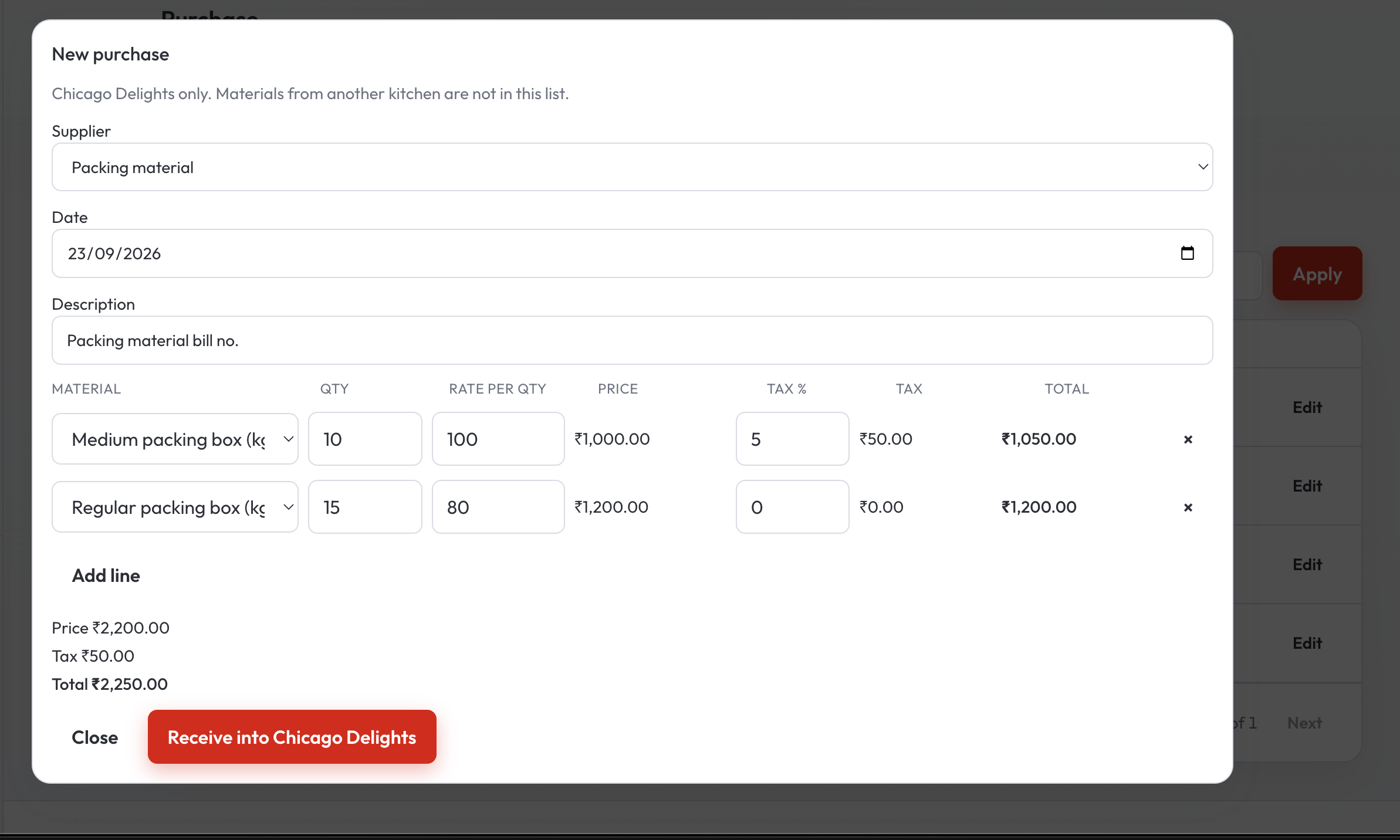
A purchase is the material, the quantity, and the rate for one unit. Saving the bill puts the quantity on hand and keeps the price with that day and that supplier. Find the bill again by today, yesterday, the week, or dates you pick.
Procurement: one material, every supplier
Under Inventory, open Procurement. The material list starts on --All--. The rows are purchases, latest day first. A row is one material from one supplier on one day: the supplier, the price per unit, and how many times that material has been bought, counting every supplier.
When that supplier bills the same material again on the same day, it stays on that row. The price is weighted by the quantities, so two deliveries become one rate for that day.
The graph that compares them
Open the row. The last 30 days of purchased price appear as bars. Each supplier has its own color, and the legend under the graph names the bar. The price sits on the vertical axis. Hover a bar and you see that supplier, the purchase price, and its date.
Move the dates when you want another stretch. One range stays within 3 months, and a day stays on today or earlier. That picture is the supplier price comparison: who climbed, who stayed flat, and who you have bought from across those days.
You still place the next order. You place it with the trader the history supports, while the rate is still a bar you can point at. The cost of dishes you have already sold stays with real time gross profit. Procurement is the price you paid on the way in.
Who this is for
A single kitchen that buys oil from more than one trader. A hotel floor or a food court where each kitchen receives its own bills and still wants the rates in one sign-in. The walk-through of the screens is Complete Inventory Management. Plans for the floor stay on pricing.
Questions from the store room
How does QuickKOT compare supplier prices?
Procurement lists each material by day and supplier. Open a row and the graph draws one bar per supplier for the last 30 days. The price sits on the vertical axis. Hover a bar for that purchase price and its date. The dates can move within 3 months, and a day stays on today or earlier.
What if the same supplier billed the same material twice in one day?
Those purchases stay on one row. The price is weighted by the quantities. That supplier is still one bar on the graph.
Who chooses the next supplier?
You do. The graph shows what each trader charged over the days you pick, and how often you have bought that material. The next order is placed with the supplier you choose.
Is supplier price comparison on the floor plan?
The floor runs on the plan: orders, kitchen tickets, and the bill. Inventory Management is the add-on for suppliers, purchases, and Procurement. Write to support@quickkot.com.
More: Inventory Management, Complete Inventory Management, and real time gross profit.