Not every QuickKOT floor is a food court. Picture a 12-cover café: filter coffee, two sandwiches, a bun omelette, a fridge of cold drinks. Saturday is busy. Tuesday is not. They will never need a food-court kitchen cap or Token Display. They still need the order to leave the till faster than a notepad, and a GST bill that does not embarrass them if someone asks.
That is a limited-order floor — and it is a first-class QuickKOT use case, not a demo they will outgrow by next week.
What “limited orders” means on the plan
Basic is free: 40 orders a day, one kitchen, one manager, postpaid only, 10 tables. The manager ticket list is enough for a single cook who can see the screen from the espresso machine. The bill carries the café name, address, FSSAI, and GSTIN. Guests pay cash, card, or UPI (or a split). Completed orders stay searchable if you must change payment mode.
Forty covers is a full café lunch, not a mall. If Saturday spills over, Economy (₹499 / month) lifts the cap to 120 orders, turns on full kitchen display, prepaid, a second user, stock alerts, and Excel export. They do not change menu structure. Station → category → item stays.
A Saturday lunch, start to close
A couple walk in. The cashier rings bun omelette + filter coffee on the till — not on a pad that the cook has to squint at. The kitchen ticket is the order. On Economy the cook’s tablet shows quantity, variant, and notes in Aqua; they tap start cooking, then mark ready, then picked up. The couple pays UPI at the counter. The bill is a tax invoice, not a handwritten total.
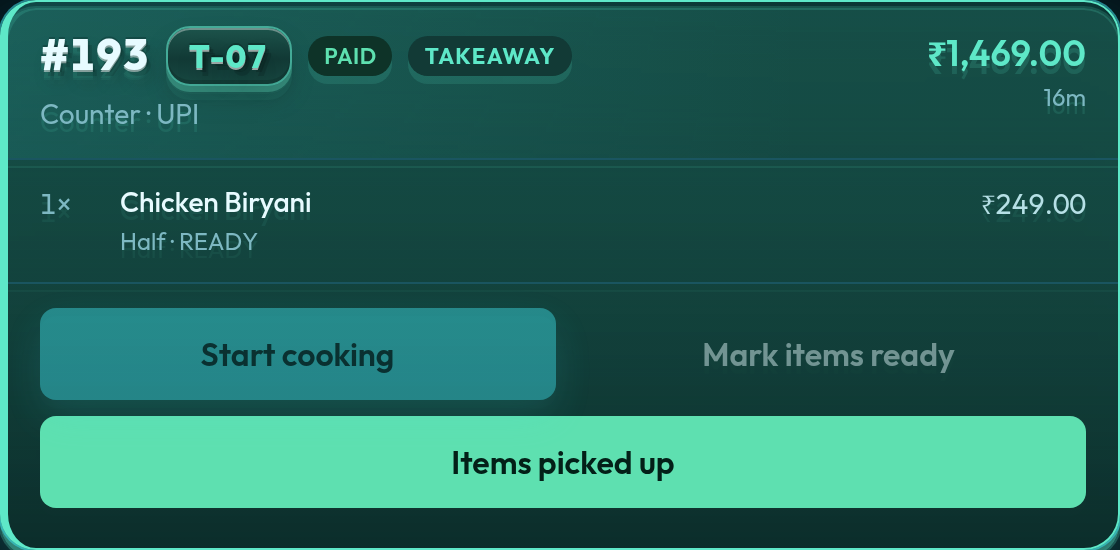
That is the efficiency: no re-writing the order, no “what table was the omelette?”, no GST surprise at the end. Limited volume does not mean slow tools. It means the tool should stay out of the way.
What this café should not buy yet
They do not need Multi-Outlet, Token Display, a food-court kitchen list, or QR ordering on day one. QR menu is on Premium and Enterprise (the same feature; Enterprise only starts with higher kitchen and user caps). Email support if an Economy restaurant needs it. A 12-seat café’s problem is usually the notepad, not a 20-person line. Start on Basic. Add Economy when the cook wants their own display or 40 bills is tight. Read QR menu for restaurants and food courts when the counter actually queues.
When the café grows
A second counter in the same room with one guest bill is centralised billing — the food-court model. A second café in another neighbourhood is Multi-Outlet. Until then, restaurant POS on Basic or Economy is the whole product they need. Same tickets. Same GST bills. Faster than paper at 15 orders, not only at 1,500.
Self-serve signup is opening soon. Leave your details at app.quickkot.com/signup, see plans, or write to support@quickkot.com.